Clients book themselves.
Zapisum is online appointment booking that knows both your staff rota and your stations. Nobody books a chair, lift or room that is already taken.
- Clients book without an account
- Reminders with attendance confirmation
- GDPR compliant
Rondo Tyre Service
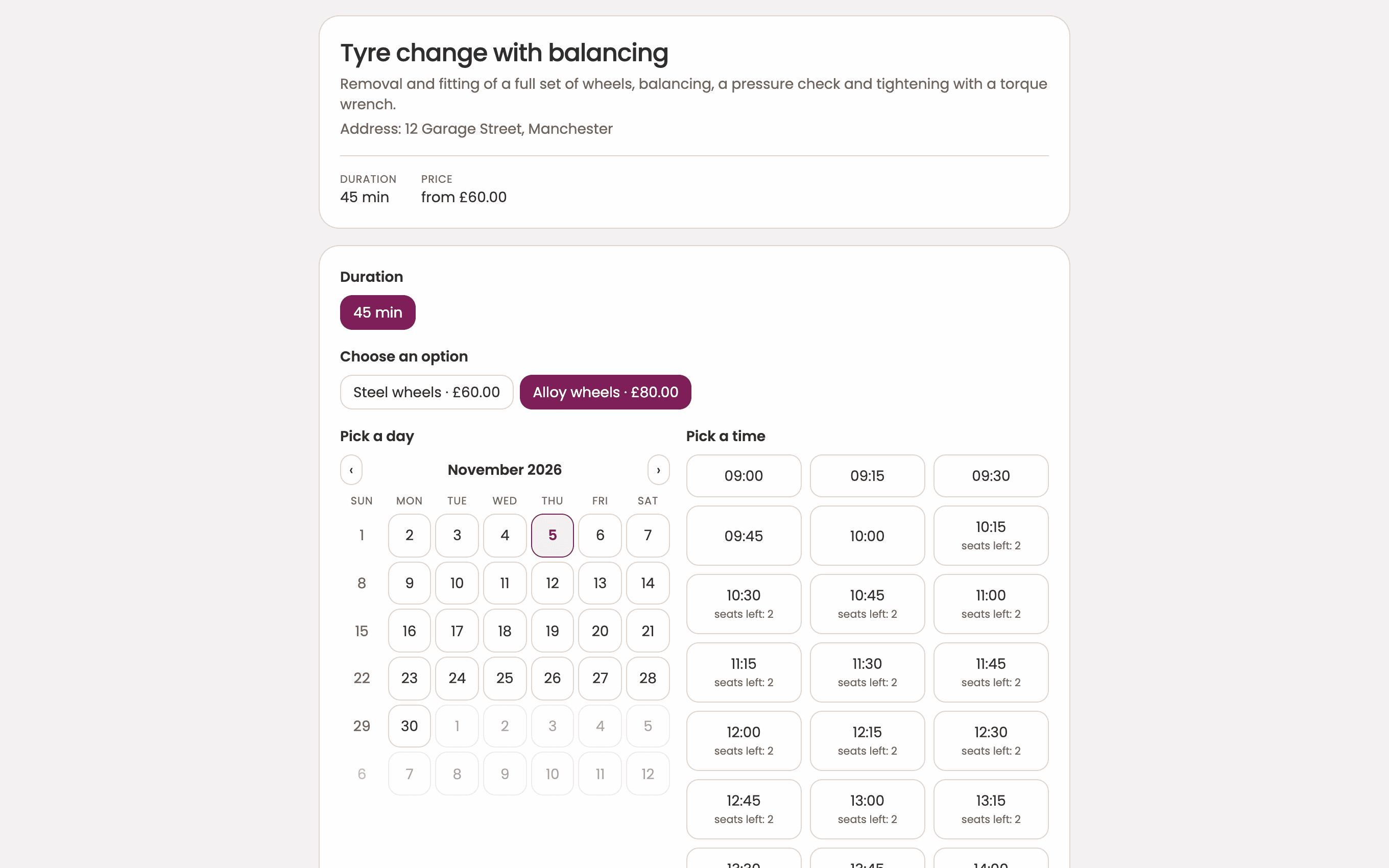
Tyre change with balancing
45 minWho should serve you?
Sound familiar? Zapisum fixes it.
The phone ringing mid-job, a client who never turned up, two cars booked for one bay. Here is each of those problems before Zapisum, and what it looks like after.
The phone rings while you work
Without ZapisumYou put down the wrench or the scissors, or pause an examination, to book someone in. After work you call back everyone you missed.
With ZapisumClients pick a service and an open slot on your booking page themselves, any time of day or night.
Clients don’t show up for appointments
Without ZapisumA forgotten appointment means an empty bay, chair or room and lost income, when someone else could have taken the slot.
With ZapisumZapisum sends email reminders and the client confirms attendance with one click. You see straight away who has confirmed.
Two clients booked for the same bay
Without ZapisumA paper diary or a plain calendar doesn’t know you have two lifts, four tyre bays, three chairs or a single treatment room.
With ZapisumYou add stations, chairs and rooms as resources. The system only offers times when the resource is actually free.
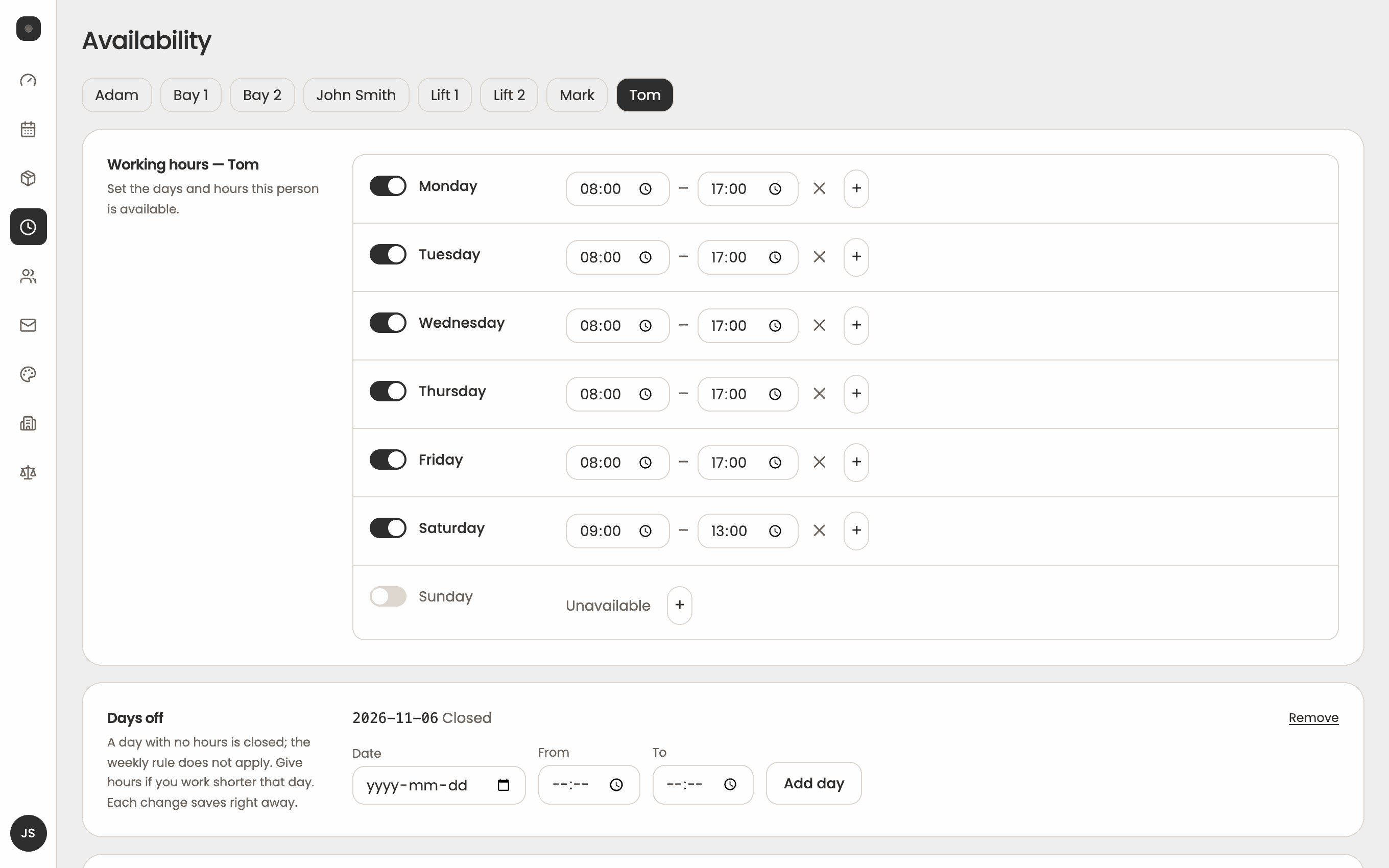
Everyone on the team works different hours
Without ZapisumJuggling the schedules of mechanics, doctors or installers by hand ends with an appointment booked on someone’s day off.
With ZapisumEach person has their own schedule, and clients can choose a specific team member or the first one available.
Cancellations and rescheduling eat up time
Without ZapisumEvery change is another call, text or message that has to be copied into the calendar.
With ZapisumClients cancel or reschedule on their own from the link in the confirmation message. Your calendar updates instantly.
Fake and mistaken bookings
Without ZapisumA typo in an email address or a booking under someone else’s name blocks the slot, with no way to reach the client.
With ZapisumEvery booking from your page requires email confirmation, so only real appointments land in your calendar.
What you get with Zapisum
Zapisum brings your booking page, team and station schedules, client reminders and control over every appointment together in one system.
Your own page where clients book themselves, at any time and without creating an account.
- Unlimited services, each with its own duration or several lengths to choose from
- Custom form fields, such as a car registration number, an address or the reason for the visit
- Your logo and colours on the booking page
- Booking page in Polish and English, with translated service descriptions
- Group classes and workshops with several places per slot
A calendar that sees people and stations
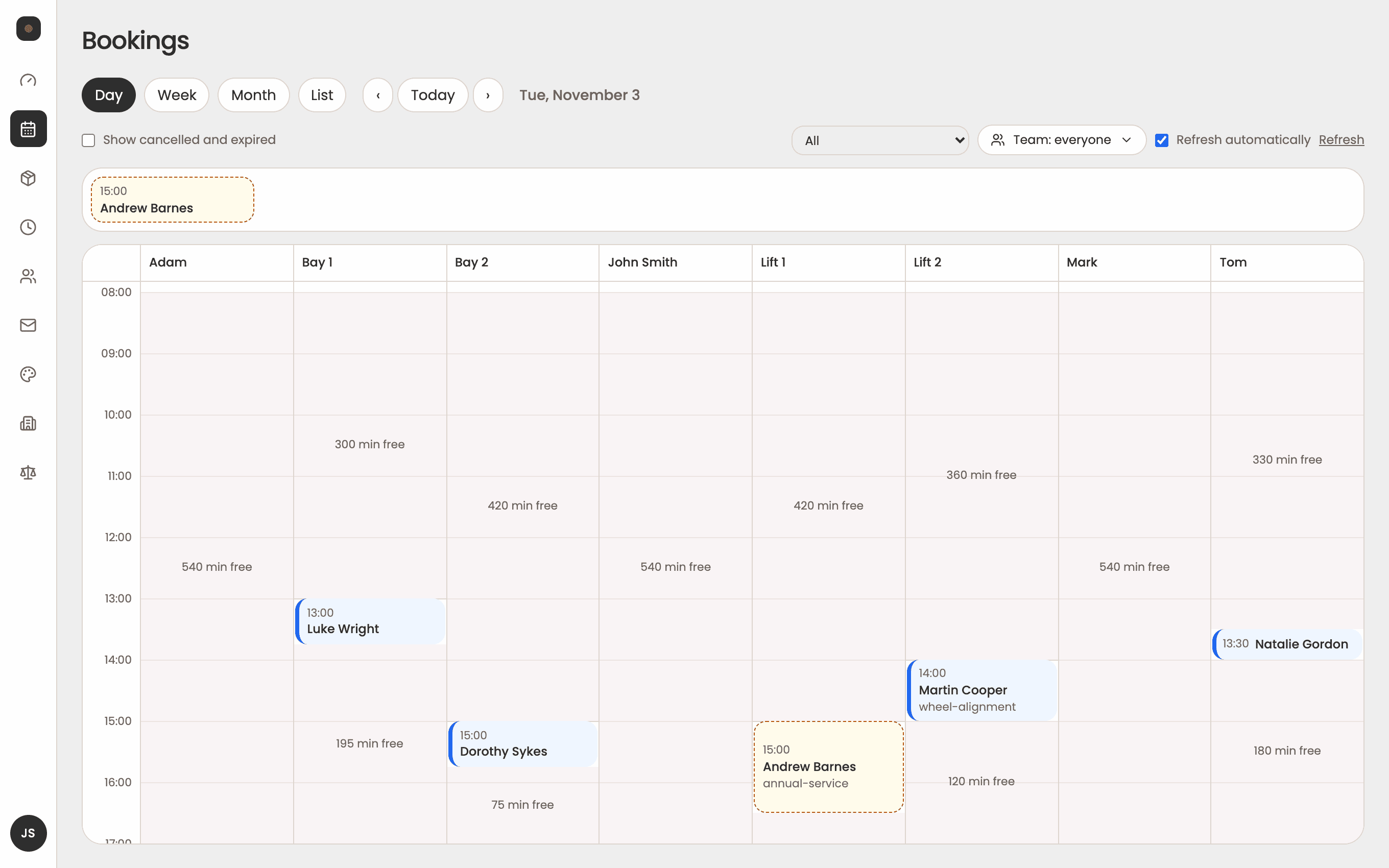
Stations have their own schedule
Most booking systems assume one person means one calendar. In a garage, a tyre shop or a salon that’s not enough, because a visit also takes up a lift, a bay or a chair. Zapisum treats them as resources with their own schedules. For each service you decide whether it’s booked with a specific person or on a free station, and clients only see times that can actually be served.
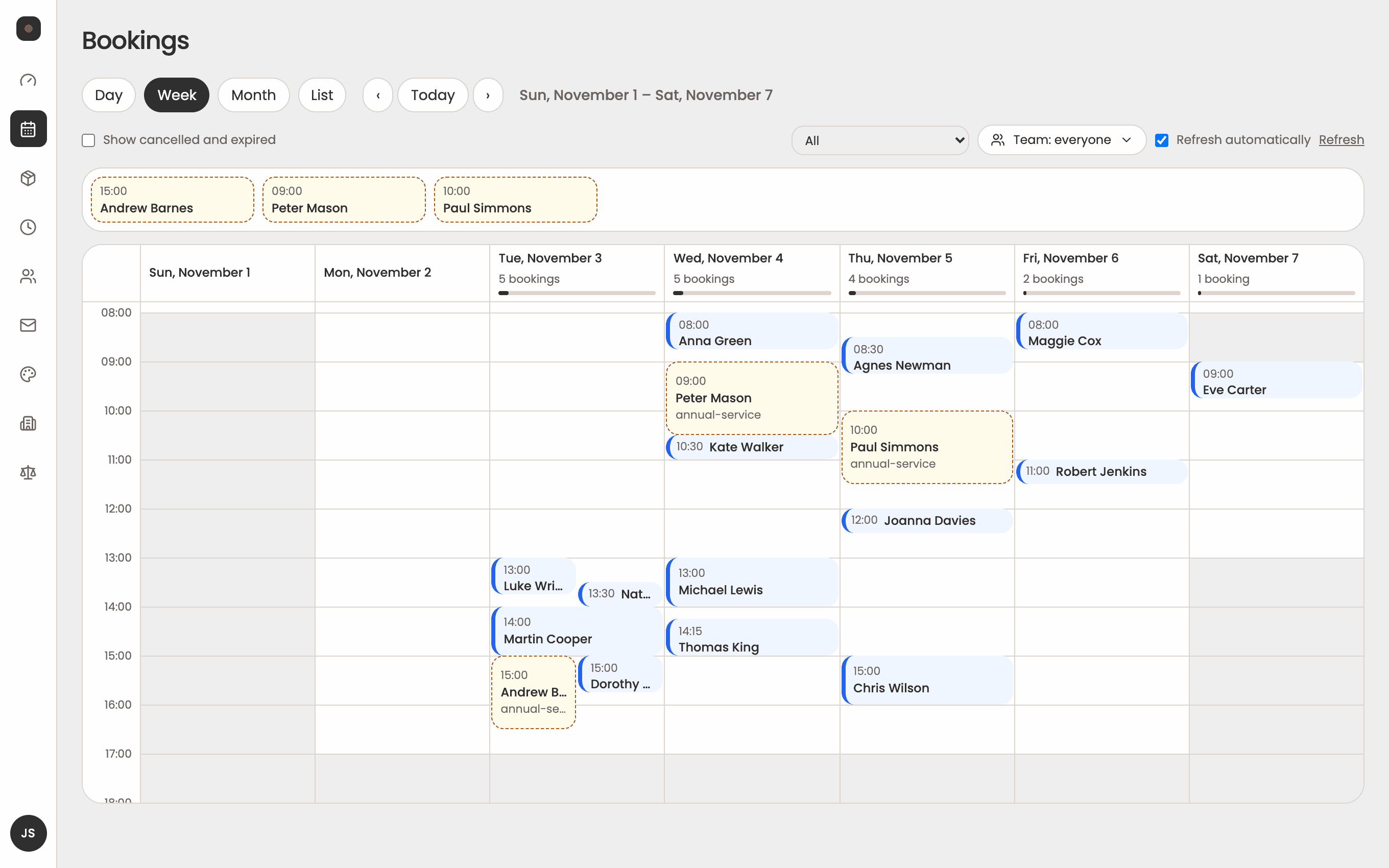
The whole day on one screen
In the panel, each day has a column for every person and every station. You see at a glance who’s busy, where there’s a free slot and which bookings are waiting for your approval.
Clients handle the rest
Your clients book from their phone in a few taps, without an account. They get a confirmation with a calendar file and, before the visit, a reminder where one click confirms attendance. If something comes up, they reschedule or cancel themselves and the slot goes back to the pool.
Every station counts
Popular booking calendars were made for consultants scheduling meetings. We designed Zapisum from the start for service businesses with a team, equipment and treatment rooms.
- Stations, not just people
- Lifts, bays, chairs and rooms have their own schedules, and the system never sells the same spot twice.
- Attendance confirmation, not just reminders
- Clients answer the reminder with one click, so you know in advance who is definitely coming.
- Services with variants and prices
- One service can have several lengths or variants with their own prices, such as steel or alloy wheels.
- Messages in your own style
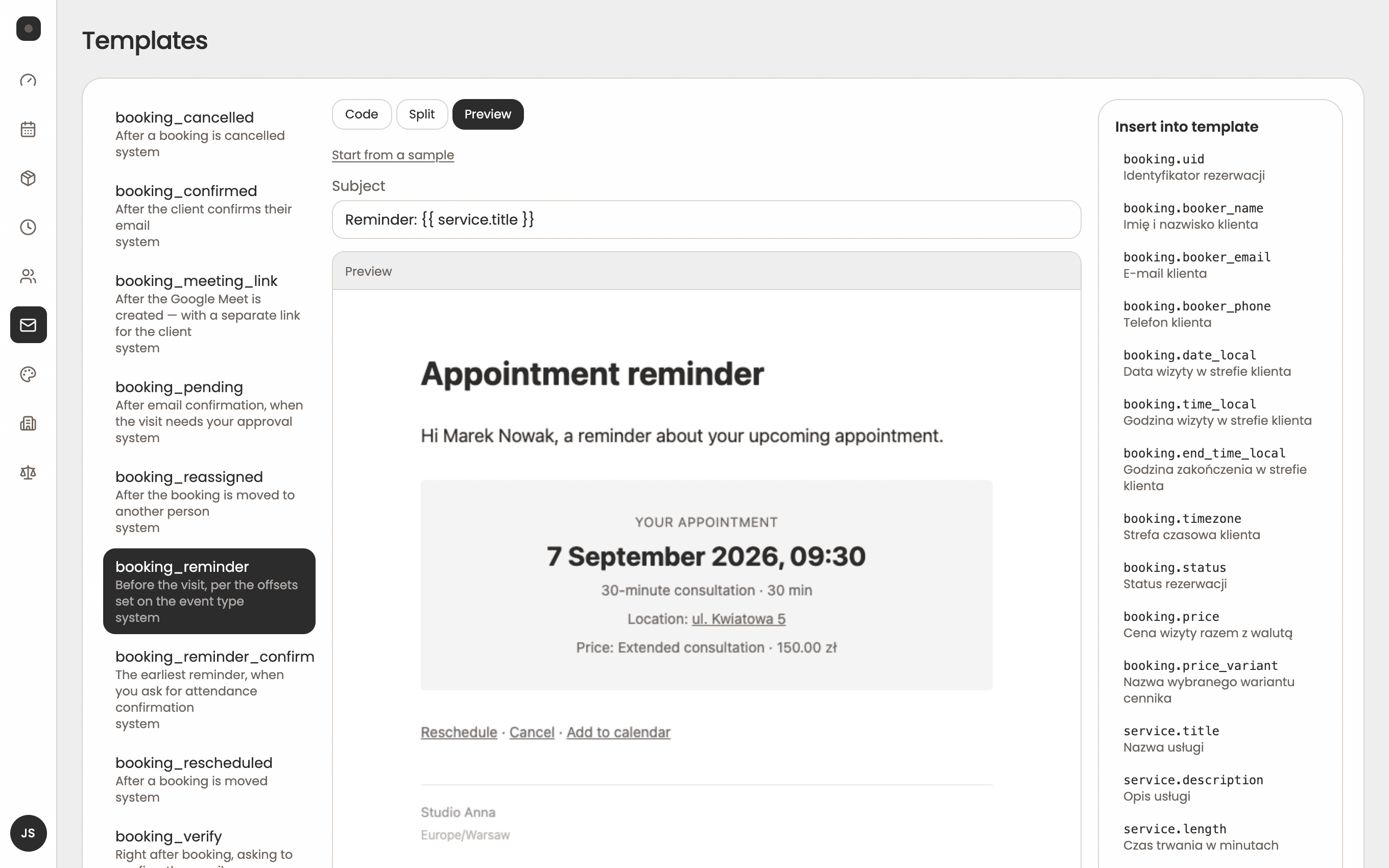
- You edit every email yourself, with a preview before sending and a separate version for each language.
- You decide what to accept
- Selected services can wait for your approval before the slot lands in your calendar.
- GDPR from day one
- Data export and deletion on request, plus automatic anonymisation after the retention period.
Made for your industry
Set Zapisum up around the way your business works: one specialist, a team or several stations.
Car garages
Inspections, diagnostics and repairs booked on a free lift, with a field for the car’s registration number.
Tyre shops
Seasonal tyre changes without a queue at the gate. Priced variants separate steel and alloy wheels.
Hair salons
Cuts, colouring and styling with a choice of stylist and services in several lengths.
Barbers
Haircut and beard with the barber of choice, and everyone on the team has their own schedule and booking link.
Medical practices
Patients book without calling reception and confirm attendance with one click before the visit.
Specialists
Physiotherapists, psychologists, dietitians and trainers: breaks between visits, group sessions and a personal link.
Installers and technicians
Air conditioning installs or equipment servicing: address and job details in the form, plus travel time between visits.
Cleaning companies
Home and office cleaning with teams as resources, floor area in the form and prices by variant.
Four steps to your first booking
Try ZapisumCreate an account
Enter your business name, email and a password, then activate the account from the link in the message.
Add services, team and stations
Add services with durations and prices, add staff or stations and set your working hours.
Share your booking link
Put it on your website, Google Business Profile, Facebook and Instagram, or send it to clients in a message.
Take bookings
Clients book themselves, reminders go out automatically and you see every visit in the panel.
Start taking bookings online today
Create an account, add your services and share the booking link with your clients. Want to see it in action first? Pick a time for a demo — we’ll show Zapisum using your industry as an example.
Try ZapisumBook a 20-minute demo
Online, no strings attached. Pick a time that suits you and the confirmation will land in your inbox.
Simple pricing, no surprises.
30 days free · no credit card
Your first 30 days come with the full Pro plan for free, no card required. Then you pick the plan that fits your business.
Start
For one person or one workstation.
€12excl. VAT / month
- Booking page in your brand colours
- Services with prices and variants
- Unlimited bookings
- E-mail confirmations and reminders
- Clients cancel and reschedule on their own
- Approve bookings before they are confirmed
Pro
For teams and businesses with several workstations.
€24excl. VAT / month
- Everything in Start
- Multiple people and workstations, each with its own schedule
- Clients choose a person or workstation
- Move a booking to someone else
- Busy times from Google Calendar, Outlook and Apple
- Your own e-mail wording
- Extra fields in the booking form
- Choice of booking page layout
If you don’t pick a plan after the trial, the panel switches to read-only and your data stays in the system.
Frequently asked questions
Can’t find your answer? Book a 20-minute demo and we’ll answer every question about your business.
- Do clients need an account to book?
- No. Clients choose a service and time, enter their name and email, and confirm the booking from the link in the message. Only you, as the business owner, create an account.
- Can Zapisum handle several stations or lifts?
- Yes. You add stations, lifts, chairs and rooms as resources with their own schedules. For each service you choose whether it is booked with a specific person or on a free station.
- Can each team member have their own schedule?
- Yes. Everyone has their own working hours, days off and booking link. Clients can pick a specific team member or the first one available.
- Does Zapisum work with Google Calendar?
- Yes. You can connect a Google, Outlook or Apple calendar. Zapisum checks it for busy times and won’t offer clients slots when you have other plans, and it adds every booked appointment to your calendar, updating it when the visit is rescheduled or cancelled. In Google Calendar an online appointment can get a Google Meet link straight away. Clients get a file to add the visit to their own calendar.
- Are reminders sent by text message?
- Confirmations and reminders are currently sent by email, and clients confirm attendance with one click. Text message delivery is planned for future versions.
- Can clients pay online when booking?
- Not yet. Online payments, including Polish payment gateways, are planned. You can already show service and variant prices on the booking page.
- How do I add booking to my website?
- Every business gets its own booking page with an address you can put on your website, Google Business Profile or social media. You can also embed the booking page directly on your site.
- Can clients cancel or reschedule themselves?
- Yes, from the link in the confirmation message. The freed slot goes straight back to the pool for other clients.
- Is Zapisum GDPR compliant?
- Yes. The booking form collects the client’s consent, you can export or delete data on request, and after the retention period the system anonymises it automatically.